⏰🏆Master your time with Collabow! Organise your business, track work progress, and achieve your goals efficiently. Say goodbye to chaos and hello to streamlined productivity. #TimeManagement #BusinessGoals #Productivity #Collabow
Elevate Your Team’s Productivity with Collabow
As a team leader, supervisor or business owner, you will know that managing tasks and projects efficiently is crucial for success. That’s where Collabow comes in – a powerful tool designed to enhance productivity for remote and hybrid teams. With its extensive features, Collabow makes task management and collaboration a breeze.
How can Collabow help
Remote and Hybrid Teams: Collabow is a game changer for remote and hybrid teams. Its intuitive platform allows you to create tasks, prioritise them, set deadlines, assign them to contributors and track assignments effortlessly. You can boost your team’s productivity and achieve your goals with reminders and seamless task management.
Project Management: Collabow offers robust tools to streamline your project management. From task creation to deadline tracking, it’s packed with features to keep your projects on track. Whether you’re managing a small team or a large organisation, Collabow has the tools you need.
Collaboration: Teamwork is made easy with Collabow. Its collaboration features, task templates, and checklists simplify your workflow. Enhance cooperation and get more done together with ease.
Why Choose Collabow?
Collabow offers a wide range of features to efficiently manage your tasks and projects. It’s all there, from task creation to tags to groups and not forgetting reminders.
User-Friendly Interface: The platform is designed to be intuitive and easy to use, ensuring a smooth user experience.
Enhanced Collaboration: With tools that foster collaboration, your team can work together more effectively.
Time Management: Collabow helps you manage your time effectively, keeping your business organised and tracking progress.
Conclusion
Collabow is much more than just a cloud storage and work management tool – it’s a comprehensive solution for remote and hybrid teams, project management, and effective collaboration. With Collabow, you can streamline your workflows, synchronise your communication, manage your time, and quickly achieve your business goals. So why wait? Start elevating your team’s productivity today with Collabow!
🤝👥 Collabow is the ultimate tool for teams and businesses! Manage projects with ease using our collaboration features, task templates, and checklists. Simplify your workflow and get more done together. #TeamCollaboration #BusinessEfficiency #TaskManagement
This blog was created to help answer the question of ‘Why should my businesses use a file-sharing tool and how can it improve my operation?’ Using a file-sharing tool for your business offers several advantages that can improve efficiency, security, and collaboration. Here are some key reasons why your business should consider using one:
1. Enhanced Collaboration
Real-Time Sharing:
File-sharing tools allow team members to share files instantly, enabling real-time collaboration. This is particularly useful for remote teams or those working across different time zones.
Version Control:
These tools often include features that track changes. This ensures everyone is working on the latest version of a document and reduces the risk of errors and confusion.
2. Improved Security
Access Controls:
File-sharing tools often have advanced security features, such as permission settings, encryption, and user authentication. This ensures that sensitive information is only accessible to authorised personnel.
Data Protection:
Many tools offer data encryption and secure backups, protecting your business from data loss due to accidental deletion or cyberattacks.
3. Increased Efficiency
Centralised Storage:
A file-sharing tool is a central repository for all your business documents, making it easier to organise, search, control and retrieve files.
Automation and Integration:
Many file-sharing tools integrate with other business applications (e.g., project management, communication tools), automating workflows which help to reduce manual tasks.
4.Cost Savings
Reduced Physical Storage:
By storing files digitally, businesses can save on costs associated with physical storage (e.g., filing cabinets, office space).
Lower IT Costs:
Cloud-based file-sharing tools reduce the need for in-house servers and IT maintenance, as the provider typically handles updates and infrastructure.
5. Scalability
Flexible Storage Options:
File-sharing tools often offer scalable storage solutions, allowing your business to quickly increase or decrease storage capacity as needed without significant investment.
Adaptability:
These tools can grow with your business, supporting additional users, files, and projects without requiring a complete system overhaul.
6. Remote Work Enablement
Access Anywhere:
Employees can access files from any location and device, making it easier to maintain productivity while working remotely.
Mobile Access:
Many file-sharing tools offer mobile apps, ensuring that your team can stay connected and access important documents even on the go.
7. Compliance and Audit Trails
Regulatory Compliance:
File-sharing tools can help businesses comply with industry regulations by providing features like audit trails, user activity logs, and secure data handling practices.
Audit Capabilities:
These tools often track who accessed or edited a file and when providing transparency and accountability.
8. Disaster Recovery
Data Backup:
Many file-sharing services include automatic backups and recovery options, protecting your business from data loss due to system failures, accidental deletion, or other unforeseen events.
9. Customer and Partner Collaboration
Secure Sharing with External Parties:
File-sharing tools allow you to securely share documents with clients, vendors, or partners, facilitating smoother collaboration and communication.
Improved Client Services:
You can give clients access to important documents and updates in real-time, enhancing your service offerings.
10. Environmental Impact
Paperless Operations:
By reducing reliance on printed documents, your business can minimise its environmental footprint, contributing to sustainability efforts.
Implementing a file-sharing tool can streamline your operations, enhance security, and support business growth, making it a worthwhile investment for any organisation.
Summary
Sign up with Collabow.io via the web or mobile app to get started.
By adopting a digital workplace, businesses can future-proof their operations and ensure they remain competitive and resilient in a rapidly changing world. So, leap and let Collabow.io elevate your business to new heights. With Collabow.io, you can upload important documents, collaborate on projects and keep your genius ideas safe. Your Collabow plan includes a suite of productivity tools that you may not be utilising. A desktop web app and mobile app, camera uploads, task management, chat, comments, and much more are included for free. So, which one will you try first? Work with anyone, from anywhere, on any device. Start your journey today.
The benefits of using cloud storage for small businesses.
Start your journey with Collabow Cloud.
In today’s fast-paced digital world, small businesses increasingly need to manage data efficiently and securely. The solution? Cloud storage. Once considered a luxury for large corporations, cloud storage has become an essential tool for businesses of all sizes, offering many benefits that can significantly enhance operations. If you’re a small business owner considering a move to the cloud, here’s why making the switch could be one of the best decisions for your company.
1. Cost-Efficiency
One of the most significant advantages of cloud storage is its cost-effectiveness. Traditional data storage solutions often require substantial upfront investments in hardware, maintenance, and IT support, which can be prohibitive for small businesses. On the other hand, cloud storage operates on a pay-as-you-go model, allowing businesses to scale their storage needs according to demand without heavy initial outlay. This flexibility can free up capital for other critical business areas, such as marketing or product development.
2. Enhanced Security
Data security is a top priority for any business, and small businesses are no exception. Cloud storage providers invest heavily in security measures that are often beyond the reach of smaller enterprises. These measures include encryption and regular security audits. By storing data in the cloud, small businesses can benefit from modern security protocols, reducing the risk of data breaches and ensuring that sensitive information is protected.
3. Accessibility and Collaboration
Accessing data from anywhere is invaluable in a world where remote work is the norm. Cloud storage allows team members to access files and documents from any device with an internet connection, fostering collaboration and increasing productivity. Whether your employees are working from home, on the road, or from different offices, cloud storage ensures everyone can access the same up-to-date information, facilitating seamless collaboration and decision-making.
4. Disaster Recovery and Data Backup
Data loss can be catastrophic for a small business, potentially leading to lost revenue, damaged reputation, and legal issues. Cloud storage providers offer robust disaster recovery solutions, ensuring that your data is backed up and can be quickly restored in case of an outage, hardware failure, or cyberattack. This peace of mind allows small business owners to focus on growth and operations rather than worrying about potential data loss.
5. Scalability
As your business grows, so do your data storage needs. Cloud storage offers unparalleled scalability, allowing you to increase or decrease your storage capacity as required. This flexibility is particularly beneficial for small businesses, which often experience fluctuating storage needs based on project demands or seasonal variations. Instead of investing in additional hardware, which may become obsolete, businesses can simply adjust their cloud storage plan to accommodate their changing requirements.
6. Environmental Impact
Sustainability is becoming increasingly important for businesses from an ethical and consumer demand perspective. By using cloud storage, small businesses can reduce their environmental footprint. Cloud storage providers typically operate large-scale data centres more energy-efficient than maintaining individual on-premises servers. Additionally, the ability to scale storage needs dynamically means less wasted energy, contributing to a more sustainable business model.
7. Competitive Advantage
Finally, adopting cloud storage can provide small businesses with a competitive edge. The cloud’s efficiency, security, and flexibility allow small businesses to operate with the agility of a much larger enterprise. This can lead to improved customer service, faster response times, and the ability to leverage data-driven insights to inform business strategy. These advantages can be the difference between thriving and merely surviving in a competitive market.
Summary
For small businesses, the benefits of cloud storage are clear. From cost savings and enhanced security to improved accessibility and scalability, cloud storage provides the tools needed to operate efficiently and securely in today’s digital landscape. By embracing cloud technology, small businesses can protect their data and unlock new opportunities for growth and innovation. If you haven’t yet made the move to the cloud, now is the time to consider how this powerful technology can transform your business.
By adopting cloud storage, small businesses can future-proof their operations, ensuring they remain competitive and resilient in a rapidly changing world. So, take the leap and let Collabow Cloud elevate your business to new heights.
With Collabow.io, you can upload important documents, collaborate on projects and keep your genius ideas safe. Your Collabow plan includes a suite of productivity tools that you may not be utilising. A desktop web app and mobile app, camera uploads, task management, chat, comments, and much more are included for free. So, which one will you try first?
Work with anyone, from anywhere, on any device. Start your journey today.
When you store your files in Collabow Cloud, they are safe, synced, and always accessible. You can easily share files, collaborate with others, stay updated, and get work done whether you’re at home, in the office, or on the go. With the Collabow app, all your files are available on the go.
Transform your business: Go mobile and get work done from anywhere
Download today to increase your alignment, efficiency, and productivity. In today’s digital age, reliable and effective cloud storage solutions are essential.
The Collabow Cloud, a trusted name in the industry, is now available as a mobile app for maximum convenience.
All your stuff is available on the Go
Tired of wasting time trying to find where you saved a photo or an important document? Say goodbye to searching and frustration by accessing your files on all your devices. Simply download the Collabow mobile app and it will automatically link to your web app.
Go digital and keep your genius ideas safe
It came to you out of nowhere, a genius idea! Now, make sure you don’t lose it (writing it on a napkin isn’t enough)! Get it into the cloud, where it’s safe and accessible. Use the Collabow Notes App to keep all your brilliant ideas in one place. Your Collabow plan includes a suite of productivity tools that you may not be utilising. A desktop web app and mobile app, camera uploads, task management, chat, comments, and much more are included for free. So, which one will you try first?
Tips and Tricks
Here are a few tips to get the most out of the Collabow app.
Sync content across devices Use mobile and desktop web apps to access your files from anywhere, easily share them, and back them up on the go.
Take your digital workplace on the move Stay updated with real-time changes and manage tasks efficiently with Collabow Task Management.
Preview files easily You can view files, contents, properties, and structure without downloading them. You can also choose who can view your files while learning how to keep your most important documents safe, secure, and accessible.
Organise your files into folders and tags Use folders to centralise files and tags to effectively categorise and manage your digital assets.
Stay focused and organised with Collabow, and enjoy peace of mind.
Collabow is a digital workplace that uses the latest tools and technologies to enable new and effective ways of working, improving overall employee productivity, engagement, and collaboration with external partners or customers and increasing an organisation’s agility. Utilising a digital workspace can allow managers and leaders to digitise the operation, allowing teams to work remotely and eliminate single points of failure. Whether in a Workplace or Workspace, employees can Collabow to meet with co-workers, discuss work, brainstorm, conduct meetings, and get work done. A digital workspace includes all the online tools and processes needed to complete your work promptly. Each company or department can have a digital environment for individual teams or all employees. In the digital workplace, it is commonplace that solo workers can come to work collaboratively. The main aim behind a digital workplace is to help employees work together seamlessly without any disruption, whether in the office or remotely. A digital workplace can help operations streamline and automate their internal business processes. A digital workspace allows companies to avoid common pitfalls, such as using outdated and disjointed tools to attempt to solve complex problems. Teams should be encouraged to have a single source of truth rather than access several disconnected systems to piece together data fragments. Digital workspaces are a natural replacement for outdated physical workstations or office cubicles. They are private or shared spaces where employees and teams can be creative in their day-to-day duties, fulfilling their daily responsibilities and getting work done. Leaders should deploy digital workspaces to standardise working methods for teams and the organisation. More benefits are realised when organisations actively gather data on areas that need improvement to determine how employees can work more effectively. Digitally powered workspaces help align people, processes, and technology in organisations more closely. If you are looking for ways to improve your operation, then it’s high time you consider using Collabow.io to help maximise benefits, improve productivity, boost sales, and improve communication and collaboration while streamlining operations.
At Collabow, we frequently deploy upgrades that improve employees’ communication and collaboration. Keep checking the platform for new features, and contact our support team if you need assistance introducing the platform to your business.
We like free stuff, so we’ve provided a ‘Starter’ profile that will get you started. The ‘Starter’ profile is free, so you can use it for business, play or personal usage. You can learn more about our packages at https://collabow.io/plans-and-packages and more about the available features here.
In today’s rapidly evolving business landscape, the importance of digital transformation cannot be overstated. As we gear up for 2024, companies are presented with a golden opportunity to streamline their operations, enhance productivity, and future-proof their business by embracing digital workspaces. The transition to a digital workspace is not just a trend; it’s a strategic move that promises to revolutionise how companies operate, communicate, collaborate, and innovate. Let’s delve into why digitising your operations during 2024 and 2024 is not just a choice but a necessity.
1. Enhanced Agility in a Dynamic Market:
The business world is more dynamic and unpredictable than ever before. Rapid changes in consumer preferences, industry trends, and global events can disrupt traditional business models. Embracing digital workspaces empowers companies to swiftly adapt to these changes, making them more agile in responding to market demands. Cloud-based collaboration tools, project management platforms, and virtual communication solutions enable teams to collaborate seamlessly from any location, ensuring business continuity despite unforeseen challenges.
2. Optimised Efficiency and Productivity:
In the pursuit of operational excellence, efficiency and productivity are paramount. Manual and paper-based processes often introduce bottlenecks and inefficiencies that hinder growth. By transitioning to digital operations, businesses can automate routine tasks, eliminate paperwork, and streamline workflows. This not only reduces human error but also allows employees to focus on high-value tasks that drive innovation, customer experience, sales and growth.
3. Empowering Remote Work:
The COVID-19 pandemic accelerated the shift towards remote work, and this trend is here to stay. Digital workspaces provide the infrastructure needed for remote and hybrid work models. With the right tools in place, teams can collaborate, communicate, and share resources as if they were in the same physical location. This not only boosts employee morale but also expands the talent pool by enabling companies to hire from anywhere in the world.
4. Data-Driven Decision Making:
In the digital age, data is a valuable asset that can drive strategic decision-making. By digitising operations, companies can collect, analyse, and leverage data to gain insights into customer behaviour, market trends, and operational performance. These insights enable informed decisions that fuel innovation, improve customer experiences, and ultimately lead to better business outcomes.
5. Enhanced Security and Compliance:
Data security and regulatory compliance are top priorities for businesses across industries. Digital workspaces offer advanced security features, such as encryption, multi-factor authentication, and secure data storage, to safeguard sensitive information. Moreover, digital tools make it easier to adhere to industry-specific regulations and compliance standards, reducing the risk of costly legal repercussions or the ability to locate important information promptly.
6. Sustainability and Cost Savings:
As environmental concerns continue to grow, businesses are under increasing pressure to adopt sustainable practices. Digitising operations reduces the need for physical resources, such as paper and office supplies, leading to a smaller ecological footprint. Additionally, digital processes often result in cost savings related to printing, storage, and manual labour.
7. Competitive Advantage:
Staying ahead in today’s competitive landscape requires innovation and differentiation. Companies that embrace digital workspaces can differentiate themselves by offering faster response times, more personalised services, and seamless customer experiences. This competitive edge can lead to increased customer loyalty and market share.
In Conclusion
The decision to digitise operations in 2024 is a strategic imperative for businesses that seek to thrive in a rapidly changing world. By enhancing agility, optimising efficiency, empowering remote work, embracing data-driven insights, bolstering security, and reaping the benefits of sustainability, companies can position themselves as leaders in their respective industries. The digital workspace revolution is underway, and those who seize the opportunity stand to reap the rewards for years to come.
Collabow.io is a Digital Workspace that provides cloud storage, document management, collaboration and task management tools that help teams create, organise, share, and monitor online content in one place. A highly engaged team is the holy grail of business success, so ensure your teams have the information to achieve their goals by using Collabow.io. We like free stuff, so we’ve provided a ‘Starter’ profile that will get you started. The ‘Starter’ profile is free, so you can use it for business, play or personal usage. You can learn more about our packages at https://collabow.io/plans-and-packages and more about the available features here.
Key Variables To Consider When Selecting a File Site or Program
When deciding which is the best file-sharing solution to solve your business needs. The following considerations will play an essential role in the decision
1. Speed
The speed of file sharing is essential when collaborating online or sharing files remotely. Thankfully, with clickable links, you can instantly share a file. However, speed still matters because how fast you send a file depends on how fast it is uploaded to the cloud storage.
2. Security and Privacy
The security that your data is encrypted and the privacy that no unauthorized user can access your data are also very important. Therefore, when a user selects a tool for file sharing or uses it as cloud storage, security and privacy also matter.
3. File Size and Bandwidth limit
The file size limit shows the maximum size of files that can be shared in one day or once. The bandwidth limit expresses the usage by each user to download the stored data. The higher the file size and bandwidth limit, the better.
4. Cloud Storage Size
Cloud storage size is a general factor that matters when choosing a file-sharing website to collaborate with others or share different file formats remotely.
5. Price
Of course, if a tool is affordable and fits your budget, it will only be worth considering. Therefore, pricing is also an important consideration when choosing a tool.
Collabow
Collabow is a new file storage service based in the UK and is the most ground-breaking company in the group. The workspace has an intuitive, user-friendly and straightforward design that makes it easy for users to get on board, collaborate and be productive. Managing, sharing, transferring and storing files is streamlined using the file management platform. It comes packed with productivity features, including to-do lists, task management, chat, and timelines.
Pros
Cons
Quick and easy file sharing
-Mobile app currently unavailable
Access files anywhere with cloud storage
Lesser known platform
Compatible with all OS
Starter profile doesn’t have all features available in the Pro package
Free storage
Better User Interface on laptops and Tablets
Convenient and Easy to use interface
Frequently added features
Growing in popularity
Excellent Customer Service
Pricing
Collabow has free and paid versions
Starter (Free)
Pro £5.50/month
Business £8.50/month
Supported OS
Online file sharing site supports Windows, Android, macOS, and iOS
Editor’s Review – Recommended
Collabow is the best free method to transfer files across different devices in a seamless way. It is a web-based tool that is efficient, quick, and intuitive. Whether you want the best free file-sharing website or want to collaborate with team members, Collabow’s web platform is an all-in-one tool. You can share files without the hassle of uploading files from your phone to the web client or downloading your files from the web to your phone. . Collabow is compatible with Mac and Windows and even offers a free plan to users.
Google Drive
Google Drive is a cloud storage developed by Google that users can capitalize on to store their data, share large files as a clickable link, and ensure that data is secure. Different space subscriptions offer you data storage according to your needs.
Pros
Cons
Easy file sharing with an online file-sharing site
No password protection makes it a vulnerable file-sharing tool
Access files anywhere with cloud storage
Limit the file size you can upload in a day
Compatible with all OS
Internet connection is necessary for real-time sharing
Free storage up to 15 GB
Convenient and Easy to use interface
Pricing
Google Drive has free and paid versions.
Personal(Free)
Business £8.28/month
Supported OS
Online file sharing site supports Windows, Android, macOS, and iOS
Editor’s Review
Google Drive is a popular free storage that most Android and Windows users capitalize on. File sharing is easy with Google Drive, no matter what size. It is the best personal use file sharing site that can be additionally used to collaborate with your work teams in real-time
Dropbox
DropBox is the next file-sharing website and program that is worth talking about. The tool has improved a lot over time, and currently, you can sync your data across all devices, from smartphones to laptops.
The main features of DropBox are as follows:
Upload and easily share your photos, documents, and other files
Cloud storage
Arrange files in folders for easy access
Collaborate with your teams with real-time synchronization
File size up to 50 GB
Synchronize data across all devices
Pros
Cons
Easy file sharing in a secure way
Freemium model offers only 2 GB storage
Direct sharing with a clickable link
Pricing plans are expensive
Automatic backup and data synchronization across all devices
Advanced features like password protection & download tracking are not available
Free plans for limited use
Pricing
Here are the pricing plans for Dropbox
Individual (Plus): £7.99/month
Growing teams (Standard): £12/month
Supported OS
Available for all operating systems like Android, iOS, Windows, macOS
Editor’s Review
It is an easy-to-use software with a very intuitive user interface that provides you with better security features and control over file storage and sharing.
iCloud
iCloud is also an online service based on cloud storage that lets you store files in the way you want. You can upload and share different file formats like photos, documents, music, contacts, books, and much more. Cloud storage automatically creates data backups to avoid any data loss.
The main features of iCloud Drive are as follow:
Store and share multiple file formats
Apple’s email servers and calendars can also be integrated with iCloud
Apple’s inherent tool is also available for other operating systems
Password protection to increase the security of your data saved
iCloud storage is the best option you can capitalize on for file sharing across Apple devices or other operating systems. No matter what file size you want to share or create a backup, Apple’s iCloud is one of the most secure tools you will come across.
Box
Box is also popular cloud storage that can be capitalized on for file storage, management, and sharing with multiple users for personal or professional use. You can collaborate with different users in real-time regardless of the operating system. Besides, the intuitive user interface is also one reason you should choose Box.
The main features of Box are as follows:
File sharing, storage, and backup
Advanced security features and controls with intelligent threat detection
Seamless integration with over 1400 apps, including popular ones like Slack, GSuite, etc.
Share files or collaborate with other users without worrying about confidentiality
Pros
Cons
Advanced security for sharing sensitive data
Desktop sync can be slower than expected
Upload limit higher than other cloud storage
The user interface needs improvement regarding ease of use and speed
Easy to retrieve your lost data
Plans are expensive
Supports multiple languages and all regions of the world
Android Web
The main features of AirDroid web are as follows:
Transfer files from one device to another remotely
Control other devices remotely with AirDroid Personal Web
Screen sharing or mirroring to view your Android screen on a laptop
Find Phone feature to locate a lost device
Remove data or create backup files remotely
Pros
Cons
Intuitive interface for easy navigation
File size limit of up to 200 MB
Wireless file transfer across devices
Internet speed can affect a file transfer
Advanced security features
Additional features like screen mirror, remote control, etc.
Editor Review
AirDroid web is a free tool with multiple capabilities. If you want a solution for more than just file transferring, you must try AirDroid web. Besides, it is the best solution for managing and controlling your device.
WeTransfer
WeTransfer is also a file-sharing website and cloud storage that lets you share files easily across different devices and users around the world. Cloud storage offers many interesting features, including deleting or resending transfers, password-protected transfers, etc. You can directly share files or clickable links with anyone with WeTransfer.
The main features of WeTransfer are as follows:
You can choose how long to make the transfer available in storage
Password-protected transfers make it best for confidentiality
Track download feature lets you see how many times transferred files have been downloaded by other users
Resend, delete or forward the file transfers
Pros
Cons
Control over who can view, edit, or share your transferred files
There is no freemium model like other solution providers
Autoexpiring links are secure
No password protection protocols
Password-protected transfers
Reports of sending large data to the wrong recipients
Intuitive user interface
Editor Review
If you want to transfer files to multiple people at a time, WeTransfer is a good option. Besides, advanced controls like password protection and auto expiring links make it a good choice for business use and sharing sensitive data. However, if you are looking for a personal file-sharing website, WeTransfer might not be for you.
Media Fire
Last but not least, MediaFire is also trustable third-party cloud storage that can be used for file sharing with different people using other devices. The free tool makes it possible to access your data anytime, anywhere.
The main features of MediaFire are as follows:
Easily store, edit, and sort your data for free
Unlimited bandwidth and downloads with any subscription
You can collaborate with other people, from your colleagues to clients
Batch uploading and sharing of files are available.
A one-time link maintains the privacy of your data
Pros
Cons
A free-to-use tool with unlimited downloads and usage
The desktop sync client is not as effective
One-time link limits file sharing with unauthorized people
The free version has too many ads
Affordable pricing
No file encryption or versioning
Easy to share files of any size
Editor Review
It is the best choice if you want an inexpensive solution as an independent professional who has to collaborate and share files very often. However, if you are looking for more than file sharing, it might not be an effective solution.
Conclusion
We have shared different tools that can be capitalized on to transfer files remotely from one device to another. You can also share files via email using the tools mentioned. However, Collabow is the best among all due to easy to use interface, free starter profile additional features.
File sharing is the public or private sharing of files or folders on a computer connected to a network. Files can easily be shared outside a network via removable media, but the term file sharing almost always refers to sharing files on a network. File sharing allows several people to use the same file data.
Pros of file-sharing programs
Cost
Purchasing physical storage can be expensive. Without the need for hardware, cloud storage is exceptionally cheaper per GB than using external drives.
Accessibility
Using the cloud for storage gives you access to your files from anywhere that has an internet connection.
Recovery
In the event of a hard drive failure or other hardware malfunction, you can access your files on the cloud. It acts as a backup solution for your local storage on physical drives.
Syncing and Updating
When you are working with cloud storage, every time you make changes to a file, it will be synced and updated across all of your devices from which you access the cloud.
Security
Cloud storage providers add additional layers of security to their services. Since there are many people with files stored on the cloud, these providers go to added lengths to make sure your files don’t get accessed by someone who shouldn’t
Cons of file-sharing programs:
Internet Connection
Cloud-based storage is dependent on having an internet connection. If you are on a slow network you may have issues accessing your storage. In the event you find yourself somewhere without the internet, you won’t be able to access your files.
Costs
There are additional costs for uploading and downloading files from the cloud. These can quickly add up if you are trying to access lots of files often.
Support
Support for cloud storage isn’t the best, especially if you are using a free version of a cloud provider. Many providers refer you to a knowledge base or FAQs
Privacy
When you use a cloud provider, your data is no longer on your physical storage. So who is responsible for making sure that data is secure? That’s a grey area that is still being figured out.
Comparison
File-sharing sites provide services to access digital media like photos, videos, documents, etc, from anywhere for its users. It will help you to transfer large files conveniently. It will also help you to collaborate easily worldwide. This article has selected the best file-sharing platforms and highlighted their key features. Use this article to assist you in finding the best file-sharing platform for your requirements.
Do you want to familiarise yourself with the essential tools and features that should be included in a cloud storage file management system? If so, read on.
Access Anywhere & Direct Downloads
No matter what device you are using or where you are on the planet, as long as you are connected to the internet, you can upload files directly from your smartphone, tablet, laptop or even smartwatch—keeping you connected while working in remote spaces and while you are on the move is a top benefit of cloud-based storage systems.
Version Control
This feature gives you control over the lifespan of your files; it allows you to see who has made changes and when those changes were made, allowing you to fix mistakes by viewing previous versions of files before errors were made. The ability to rewind and forward changes is essential for any document management system.
Verification and Validation
With the rise of bots and impersonators, data verification and validation are becoming even more critical for file sharers. Verifying an email address gives sharers the confidence that the files they received originated from the person they expected and is authentic.
Drag & drop friendly
Sharing a file online should be intuitive, seamless and straightforward. You shouldn’t need to rummage around for files sitting in nested folders or execute 100 clicks to simply share a file. Collabow makes file sharing easy, all you have to do is drag and drop your files into our file uploader, and we’ll send your sharer an email or create a shareable URL instantly. No stress, no hassle.
Search, Sort and Filter
Some file transfer systems only provide a simple no-frills sharing mechanism. After a short period, the actual file is deleted, and the content is lost forever. The ability to extend the storage window so that the receivers can have extra time to download the file can be the difference between success and failure.
Password Protected Files
At Collabow, security is of the utmost importance. All registered users can protect their files with a unique password, ensuring that the right people can only access the content. You can set a password on each file in the workspace within a couple of clicks, so it is easy to secure your content with a minimal amount of effort.
Good transfer speeds and bandwidth
Traditional file management systems introduce restrictive file upload and download speeds. Collabow.io does not limit the speed of our Pro or Business users, and we offer incredible transfer speeds for our free users that greatly exceed 1MB per second.
Alerts and Activity log
Information needs to be accurate and timely to make the right decision. We experience hundreds of distractions every day. However, the most critical alerts are usually drowned out by noise. A great file management system should notify you of significant changes to the files you created or followed. These changes are called events and usually include newly added files, changes, shares, access and deletions, mentions in a chat or when you are assigned a new task. Collabow.io provides a handy alerts dashboard notification panel and sends email notifications in real-time.
Multiple Uploads
This is important for people who work with multiple files at any point in time. Rather than uploading one file at a time, it is helpful to have the ability to upload up to 100 files at the same time or upload a folder that contains multiple files. This feature can save people hundreds of hours and make working with cloud storage systems more user-friendly and convenient.
Chat
Chat conversations are helpful for collaboration. However, content-based discussions are the most effective solution to boost productivity and get work done. Collabow facilitates discussions that are focused on content rather than channels allowing teams to have a laser focus on a task, objective, goal, design, presentation, video or moving a document from draft to a final version.
Recycle bin
The Recycle Bin is essentially a ‘last chance’ area to recover files you or someone in your team has deleted. Imagine working throughout the night on a business proposal then accidentally hitting the delete button before sharing the file with your business partner. The Recycle Bin requires a confirmation step before the files are finally removed from the system to prevent the accidental deletion of critical data. It is hard to believe that many modern-day cloud storage systems don’t have this vital feature. This functionality is enabled by default for Collabow ‘Pro’ and ‘Business’ users, providing peace of mind and ensuring that data is safe even in an accident.
Collabow.io
Collabow.io is a Digital Workspace that provides cloud storage, document management, collaboration and task management tools that help teams create, organise, share, and monitor online content in one place. A highly engaged team is the holy grail of business success, so ensure your teams have the information to achieve their goals by using Collabow.io. We like free stuff, so we’ve provided a ‘Starter’ profile that will get you started. The ‘Starter’ profile is free, so you can use it for business, play or personal usage. You can learn more about our packages at https://collabow.io/plans-and-packages and more about the available features here.
Do you want to know how to share a file online? If so, use the guide below.
In a world of constant content creation and remote workspaces, the ability to quickly share a document with someone either across the room or across the globe is imperative for success. Rapid and reliable information sharing allows us to make informed business decisions and efficiently communicate our ideas which helps us gain a competitive advantage.
During the first half of 2022, we observed a significant increase in information sharing and online business activity. People are sharing and consuming documents in large quantities daily. Those documents range from business proposals, training material, research documents, project plans, to-do lists, design documents, meeting notes, analytical reports and customer information packs. Documents play a critical role in facilitating any business’s proper functioning and success. Collabow helps companies get work done by allowing people to seamlessly share files of all sizes to contacts in any location using our cloud-based file management system and C-Share app. This free app is designed specifically for rapid file sharing with minimum fuss. This post is focused on the best and most efficient way to share a file over the internet (without registering) in a few simple steps.
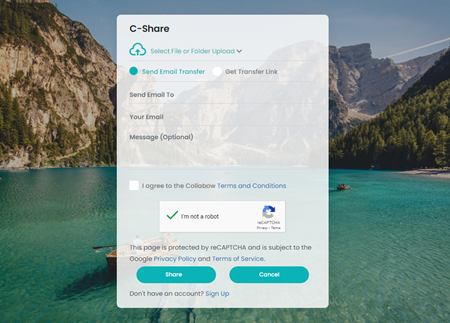
The first step is to open the C-Share web app. You can access it here: app.collabow.io/c-share
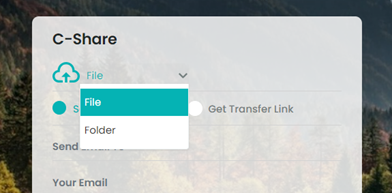
Step 2 – Select file or folder to share
The next step is to select the file that you want to share. The c-share app supports drag and drop, so drop your file in the box and hey presto. To make things easy, we’ve recently added a feature that allows you to share the contents of a folder without creating .zip files or doing anything complicated.
Step 3 – Share using an Email or URL Transfer-Link
Here, you can share the file directly to a user by email or sharing a ‘Transfer Link’.
‘Email’ is where the system sends the receiver an email with the details and a friendly message
‘Transfer-Link’ is where the app uploads the file to the cloud then generates a URL link that allows anyone with the secure link to view the file. This is an excellent option if you want to share the file with a broad audience or post it in a channel for the team to access, such as WhatsApp, Facebook, Facetime, Zoom, Slack, Skype, Asana, emails, blogs etc. The options are endless.
Step 4 – Enter the sharers contact email
Time to enter the sharer details. First, enter the address you want to send the file to; this is called the ‘receiver’, then enter your email address to validate the transfer; this person is called the ‘sharer’. You can personalise the share by typing a short message such as “Hi Pete, here is the file I promised you”.
Share 5 – Boring part
Confirm that you’ve read the legal jargon to understand the standard Collabow c-share terms and conditions. Your uploaded files are stored for a short period before they are recycled. We also need you to prove that you are not an evil robot sent to destroy the internet by clicking the reCaptcha checkbox then clicking the big ‘Share’ button.
Step 6 – Verify your file share
The system must validate everyone who uses the site for security reasons, so before sharing the file, we will send you a six-digit code to validate the transfer. Check your email, enter the code then your file will be sent.
If you are using C-Share for the first time, remember to check your spam and add us to your allowed list for future shares.
Step 7 – Congratulations on sharing your first file
As a final step, we like to confirm that your file was sent successfully, so we usually send you a notification email confirming the details on the screen and the receiver will be sent an email link to access the file.
All done – Collabow.io
Collabow.io is a Digital Workspace that provides cloud storage, document management, collaboration and task management tools that help teams create, organise, share, and monitor online content in one place. A highly engaged team is the holy grail of business success, so ensure your teams have the information to achieve their goals by using Collabow.io. We like free stuff, so we’ve provided a ‘Starter’ profile that will get you started. The ‘Starter’ profile is free, so you can use it for business, play or personal usage. You can learn more about our packages at https://collabow.io/plans-and-packages and more about the available features here.
We like free stuff, so we’ve provided a ‘Starter’ profile that will get you started. The ‘Starter’ profile is free, so you can use it to play or until you run out of storage. Read more about the Collabow.io workspace features here: collabow.io/features-list/